Why Use LangGraph for Your First Agentic AI Project
LangGraph forces you to learn state management, tools, routing, and human-in-the-loop approval — the fundamentals that survive framework churn in the fast-moving agentic AI space.
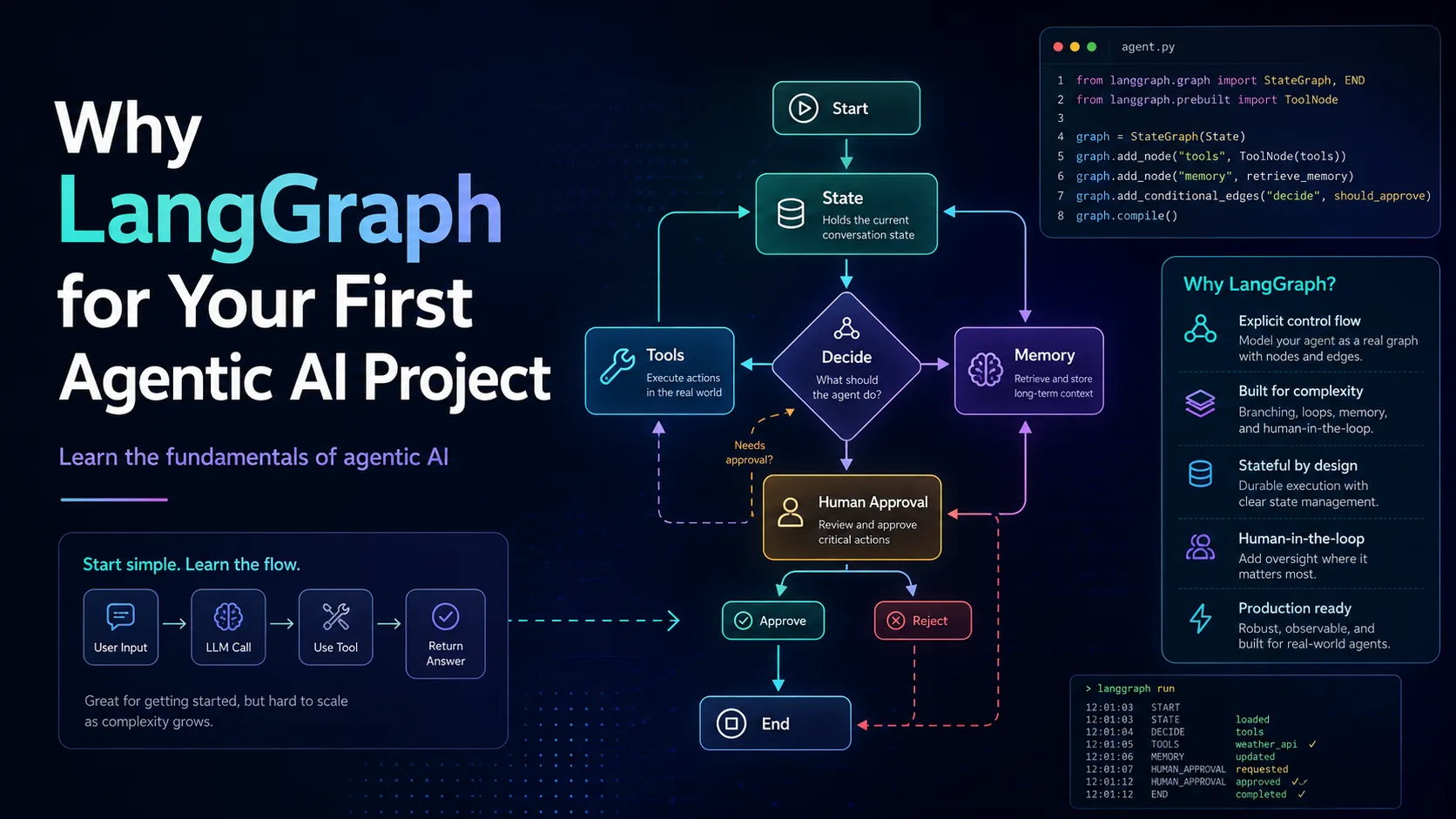
Everyone wants to build an AI agent now.
Not a chatbot. Not a wrapper around an LLM API. An actual agent.
Something that can reason, use tools, remember state, call APIs, ask for human approval when needed, and complete a task without you manually pushing every button.
And because the hype cycle is doing what the hype cycle always does, there are already hundreds of tools promising to help you build agents in one weekend. Some are no-code. Some are low-code. Some are TypeScript-first. Some come with dashboards, memory, workflows, deployment, observability, tracing, and probably emotional support if you stare at the pricing page long enough.
But if this is your first serious agentic AI project, and your goal is not just to ship something, but to actually understand how agentic systems work, I think LangGraph is one of the best places to start.
Not because it is the easiest.
Because it forces you to learn the things that matter.
A lot of people start with a very simple idea:
I will give an LLM some tools, and it will do the work.
That is partly true. But only partly.
A real agentic system needs more than tool calling. It needs structure.
You need to understand:
- What state is being carried forward?
- What tools are available?
- Who decides which tool to call?
- What happens after a tool returns a result?
- Can the agent retry?
- Can it stop?
- Can it ask a human before doing something risky?
- Can you inspect what happened when it fails?
- Can you resume the process later?
These are not small details. These are the difference between a fun demo and a system you can actually trust.
This is where LangGraph becomes useful.
It makes you think in terms of nodes, edges, state, transitions, tools, and control flow. In other words, it makes you think like someone building an agentic system, not just someone wiring together API calls and hoping the model behaves.
LangGraph is not magic dust. It will not hide all the complexity from you. And that is exactly the point.
When you build with LangGraph, you quickly learn that an agent is not some mystical AI creature floating around your codebase. It is a graph.
There is state.
There are steps.
There are decisions.
There are tool calls.
There are exit conditions.
There may be human approval gates.
There may be memory.
There may be retries.
There may be multiple actors.
Once you understand this, the entire agentic AI space becomes much less confusing.
You stop thinking:
Which framework should I worship this month?
And you start thinking:
What is the workflow? What is the state? Where should the LLM make decisions? Where should deterministic code take over? Where do I need a human in the loop?
That mindset is far more valuable than knowing one framework’s syntax.
Let me be clear: if you are not a developer and you want to get started with agentic workflows, n8n is a very good option.
It gets you moving fast.
You can connect Gmail, Slack, databases, CRMs, webhooks, APIs, LLMs, and tools without writing everything from scratch. For business automation, internal workflows, lead processing, support ticket routing, reporting, and quick experiments, n8n can be fantastic.
If your goal is:
“I want this workflow running by tomorrow”
then n8n may be the right answer.
But if your goal is:
“I want to deeply understand agentic AI as a developer”
then n8n can hide too much.
You may get the result, but not always the understanding. You may know which boxes to drag, but not fully understand what state is being passed, how the agent is deciding, where the failure modes are, or how to rebuild the same thing outside that environment.
That is not a criticism. That is the tradeoff.
n8n is excellent when you want speed and workflow automation. LangGraph is better when you want to learn the mechanics.
Mastra is interesting because it speaks the language of modern web developers.
TypeScript. JavaScript. Agents. Workflows. Memory. Tooling that feels closer to the ecosystem many developers already live in.
If you are a Node.js or Next.js developer, Mastra feels far more natural than jumping into Python, virtual environments, dependency conflicts, notebooks, and the usual “why is my package manager now a personality disorder” experience.
That matters.
A lot of developers do not want to wrestle with Python just to build an AI agent. They already know TypeScript. They already build APIs in Node. They already deploy JavaScript apps. So a TypeScript-first agent framework is genuinely attractive.
And honestly, you can probably build something useful with Mastra very quickly. Maybe even by the end of the week.
But that speed comes with a tradeoff.
Frameworks like Mastra often abstract a lot for you. That is good when you are building a product. It is not always good when you are trying to learn the fundamentals.
You may understand how to use Mastra, but not necessarily how agentic systems work underneath.
And that is risky because AI frameworks change fast. Very fast. The agent framework that looks shiny today may be abandoned, pivoted, rewritten, acquired, or replaced by another shiny framework six months later. Such is life. JavaScript developers needed another lifecycle crisis anyway.
If you only learn the abstraction, you are tied to the abstraction.
If you learn the underlying concepts, you can move anywhere.
This is the biggest reason I recommend LangGraph for your first serious agentic AI project.
The learning transfers.
When you build with LangGraph, you learn concepts that apply almost everywhere:
- state management
- tool calling
- conditional routing
- graph-based execution
- retries
- memory
- human approval
- structured outputs
- multi-step reasoning
- separation of deterministic code and LLM decisions
Once you understand these, you can use almost any other framework.
You can move to Mastra.
You can use n8n more intelligently.
You can build your own lightweight agent runtime.
You can evaluate CrewAI, AutoGen, LlamaIndex workflows, Vellum, Dify, or whatever new framework shows up next week with a landing page that says “production-ready agents” in a gradient font.
The point is not that LangGraph is the only good tool.
The point is that LangGraph teaches you the mental model.
And the mental model is what survives framework churn.
From a learning perspective, I would divide the popular choices like this:
| Tool / Framework | Best For | Learning Value | Main Tradeoff |
|---|---|---|---|
| n8n | Fast workflow automation, non-developers, internal tools | Medium | You learn workflows more than agent internals |
| Mastra | TypeScript developers who want to build quickly | Medium to High | Higher-level abstractions can hide core mechanics |
| LangChain Agents | Quick agent setup with common patterns | Medium | Easier start, but less explicit control than LangGraph |
| LangGraph | Developers who want to understand agent architecture deeply | Very High | More initial effort |
| CrewAI / AutoGen-style frameworks | Multi-agent experiments and role-based agent demos | Medium | Can encourage overusing “multiple agents” before understanding control flow |
| Custom code from scratch | Maximum understanding | Very High | Easy to waste time rebuilding solved problems |
For a first learning project, I would not start with a complex multi-agent system.
That is how you end up with five agents arguing with each other, burning tokens, and producing a Markdown file that could have been written by one function and a decent prompt.
Start simpler.
Build one useful agent with clear state, tools, and human approval.
That is enough to learn a lot.
A good first project should not be a toy chatbot.
Build something real but controlled.
For example:
A support ticket reply assistant.
The flow could be:
- Receive a support ticket.
- Retrieve similar past tickets using RAG.
- Generate a draft response.
- Check whether the response needs human approval.
- Send it to a human reviewer.
- If approved, send or save the reply.
- If rejected, revise it.
This is a perfect beginner agentic AI project because it teaches almost everything important:
- state
- retrieval
- tool use
- conditional routing
- human-in-the-loop approval
- structured response generation
- safe automation boundaries
And more importantly, it keeps the agent grounded.
You are not asking it to run your company. You are asking it to assist with a narrow task where you can inspect the output.
That is how agentic AI should begin.
Not with “autonomous CEO agent”.
Please don’t build that. Humanity has suffered enough dashboards.
If you want something strictly in JavaScript or TypeScript, try LangGraph.js.
It works.
I have used it for a support ticket workflow where the agent replied using RAG and had a human approval gate before anything went out. Not some massive enterprise-grade system, but a real enough use case to understand that LangGraph.js is not just a documentation checkbox.
If your backend is already in Node.js, LangGraph.js makes a lot of sense.
You can still learn the LangGraph mental model without forcing yourself into Python. And once you understand the graph-based architecture, the language matters less.
The important part is not Python vs JavaScript.
The important part is understanding state, tools, transitions, control flow, and where the LLM should or should not be trusted.
The biggest mistake developers make in agentic AI is giving too much control to the framework and the model too early.
They let the LLM decide everything.
They let the framework abstract everything.
Then when something fails, they have no idea where the failure happened.
Was the prompt bad?
Was the retrieved context wrong?
Was the tool schema unclear?
Was the state mutated incorrectly?
Was the agent allowed to call a tool it should not have called?
Was there supposed to be a human approval step?
Was the workflow even deterministic where it needed to be?
LangGraph makes these questions visible.
That is why it is valuable.
It forces you to design the agent instead of merely summoning it.
I am not against high-level tools.
Use n8n if you need fast automation.
Use Mastra if you are a TypeScript developer and want a modern, productive framework.
Use managed platforms if your company needs speed, deployment, and observability.
But for your first serious agentic AI learning project, use something that exposes the fundamentals.
LangGraph sits in a good middle ground.
It does not make you build everything from scratch, but it also does not hide the architecture from you. You get enough structure to build something real, and enough visibility to understand what is happening.
That is the sweet spot for learning.
If your goal is to build one automation quickly, use whatever gets the job done.
But if your goal is to learn agentic AI properly, start with LangGraph.
Learn state.
Learn tools.
Learn routing.
Learn human approval.
Learn where deterministic code should control the workflow and where the LLM should make decisions.
Once you understand these basics, frameworks become replaceable.
And that is exactly where you want to be.
Because in agentic AI, the tools will keep changing.
The fundamentals will not.